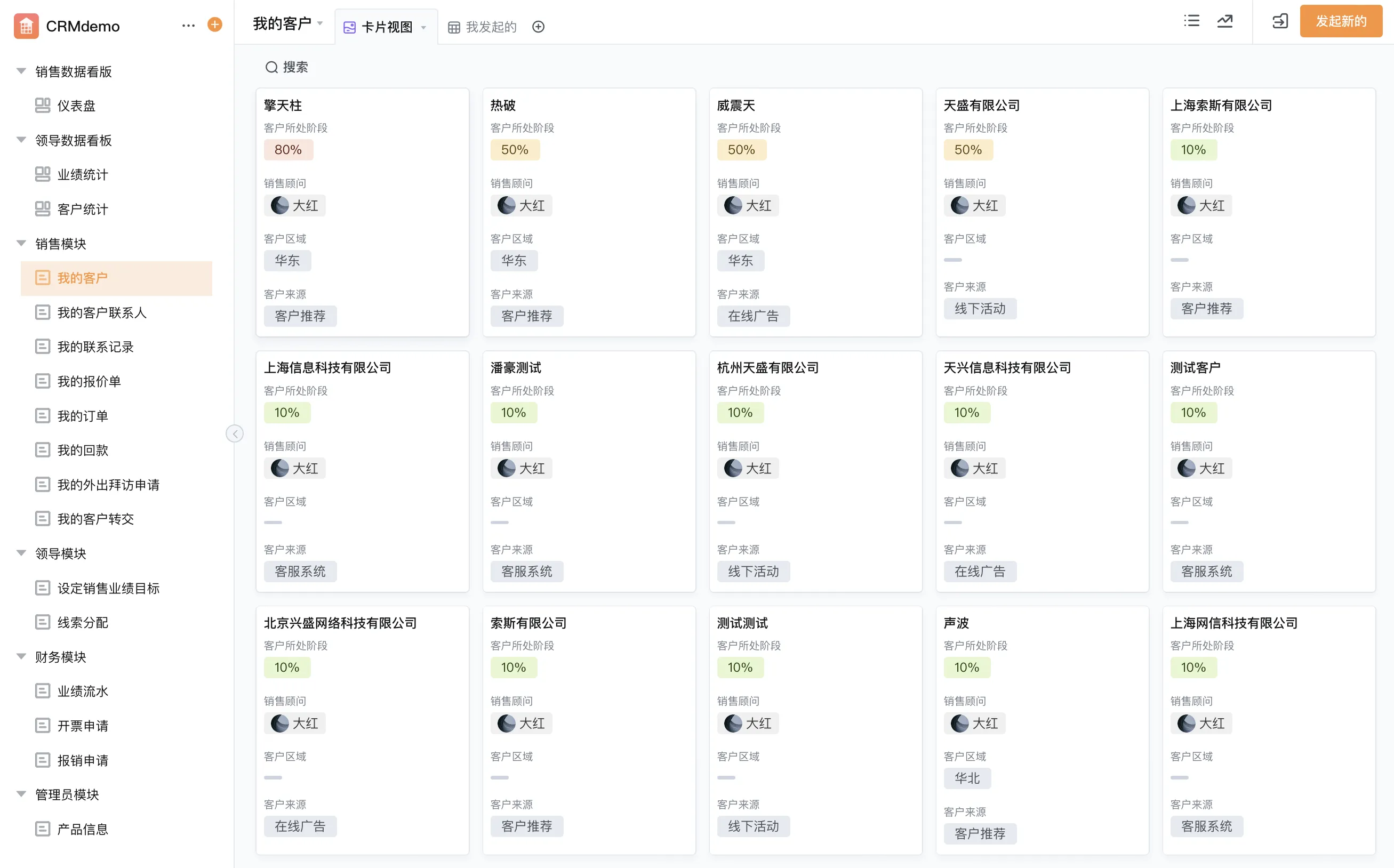
What does CRM mean in daily work?
CRM can refer to a management approach, the data a company maintains about customers and prospects, or software used to organize those records and workflows. In practical terms, it helps teams keep context when people change roles or conversations happen across channels. A useful customer record can connect an account and its contacts with activities, opportunities, quotations, contracts, orders, and service requests where those are part of the organization’s process.
CRM is not simply a contact list. A list may hold names and phone numbers, but a managed CRM process defines how a lead is qualified, how an account is assigned, when follow-up is due, and what happens when an opportunity advances or is lost. The process should match how the organization sells and serves customers rather than forcing every team into the same unsupported stages.
- Keep contact and account details accurate.
- Record meaningful interactions and agreed next steps.
- Make relationship ownership visible.
- Use documented handoffs when another team takes responsibility.
Who benefits from a CRM process?
What is CRM for small businesses in practical terms? It is a shared way to capture customer details and keep follow-up from depending on one person’s memory. A small company might begin with a customer register, owner field, next-action date, and interaction history. The goal is to create enough structure for continuity without making data entry so burdensome that people avoid it.
CRM for B2B sales teams can coordinate longer buying journeys involving multiple contacts, stakeholders, proposals, reviews, and internal contributors. A team may need to distinguish the account, contacts, opportunity, and activity rather than storing every detail in one note. Service or operations colleagues can also benefit from a clear handoff when a sale becomes an order or support request.
Core CRM records and how they relate
| Record | What it represents | Useful ownership question |
|---|---|---|
| Lead or inquiry | An initial person or organization that may become a qualified prospect. | Who reviews it, and when is it accepted or disqualified? |
| Account | The customer or prospective organization. | Who owns the overall relationship and account data? |
| Contact | A person connected to an account, with a defined business role or relationship. | How will duplicates and outdated contact details be managed? |
| Opportunity | A potential commercial outcome the team tracks through agreed stages. | What evidence is required to move it to the next stage? |
| Activity | A call, meeting, email follow-up, task, or other recorded interaction. | What must be recorded for another teammate to continue the work? |
| Handoff | A transfer to order management, delivery, finance, or customer service. | Which team accepts ownership, and what information must accompany it? |
Build a CRM workflow that supports the customer journey
A CRM workflow should make the next action clear while leaving room for professional judgment. One illustrative B2B process could begin with an inquiry, move through qualification and discovery, record a proposal, then document the outcome and handoff. This is an example, not a universal sales methodology. Teams should choose stage names that describe observable customer or business events.
- Capture consistently. Record the source, organization, contact details, and reason for inquiry using agreed fields.
- Assign an owner. Define how accounts or leads are assigned and how reassignment is documented.
- Qualify with context. Record the customer need, relevant stakeholders, fit questions, and next step rather than an unsupported score alone.
- Track progress. Use stage criteria that help the team understand what has happened and what remains unresolved.
- Plan follow-up. Give each active opportunity an owner and next action, with reminders where appropriate.
- Close or hand off. Capture the outcome and transfer the agreed information to delivery, order, or service teams.
- Maintain the record. Correct duplicates, update contact changes, and close stale work according to a defined review process.
CRM workflow automation: use it to coordinate, not obscure
CRM workflow automation can assign new inquiries, remind an owner about follow-up, route a discount or contract for review, and notify a service team when a handoff is ready. Automation is most helpful when the trigger and expected outcome are unambiguous. If a rule cannot explain why it routed a task, users may not trust it. Keep exceptions visible and provide a way to correct incorrect data or ownership.
Automated email or AI-generated summaries, where available, require their own review of permissions, accuracy, and customer communication standards. Do not let an automated status substitute for a meaningful customer interaction. Keep a human responsible for promises, negotiated terms, and decisions that depend on context.
Keep customer data useful and governed
Agree on definitions for account, contact, lead, and opportunity before building reports. Set rules for duplicate detection, required fields, ownership changes, and record closure. Make permissions reflect the roles that need to view or update customer data. A CRM report cannot compensate for incomplete records; it may instead give a misleading picture of pipeline or follow-up.
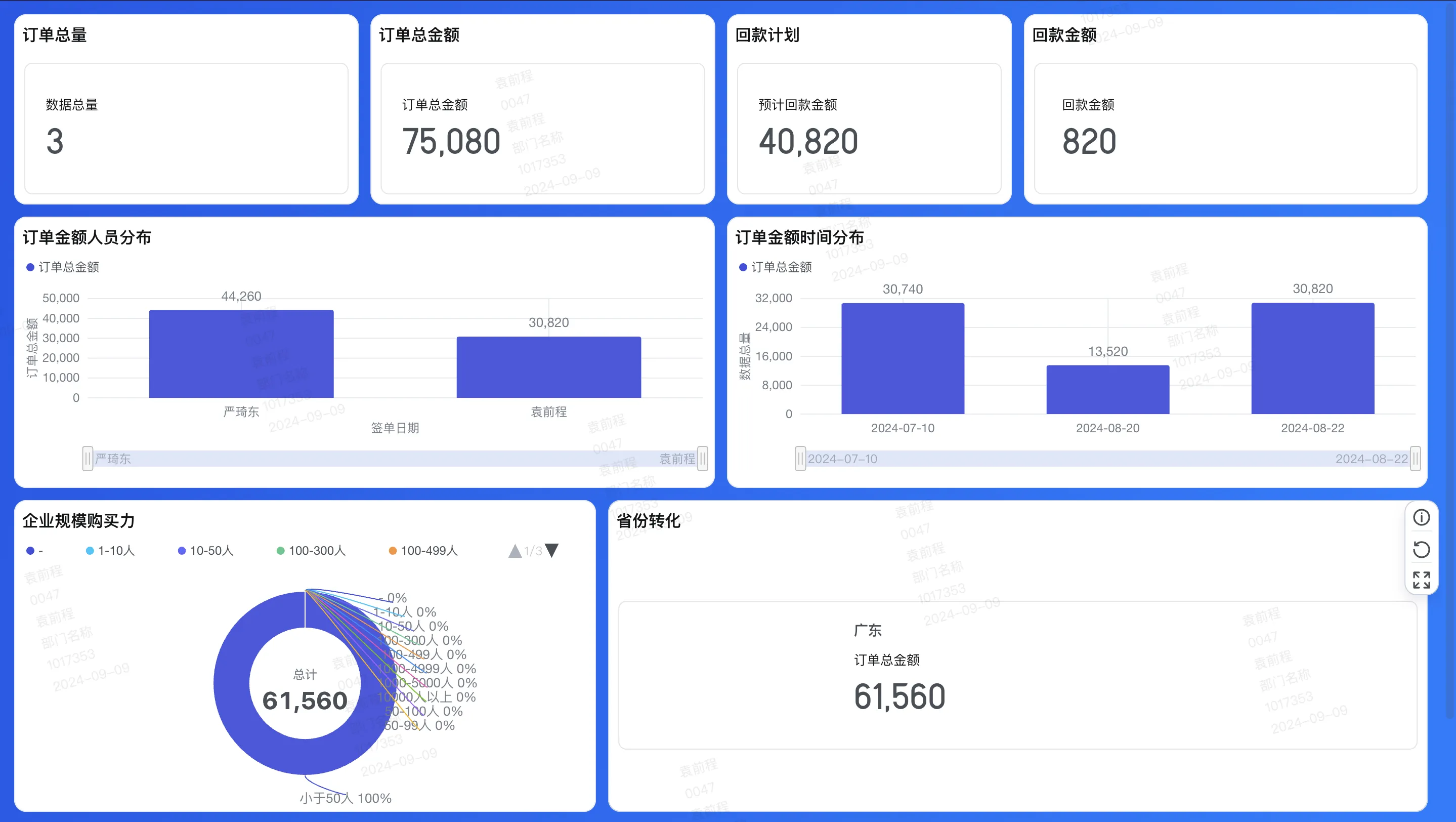
Use reporting to ask operational questions: Are active opportunities missing a next step? Are inquiries waiting for assignment? Are handoffs accepted? Define every metric and its time period, and review the underlying records before using results to compare individuals or teams. This keeps management conversations grounded in consistent information.
Where a configurable platform can support CRM work
Some teams need a CRM process that reflects their own account structure, handoffs, or internal approval steps. A configurable platform can be used to build business applications around forms, customer data, workflows, reports, and permissions, depending on implementation. Qingflow can be configured for CRM-related processes such as customer records, sales collaboration, follow-up, and management visibility. That does not establish that every specialized CRM capability is included in every setup, so evaluate the platform against the team’s specific data and process needs.
Conclusion
CRM is a shared operating practice for customer information, ownership, follow-up, and handoffs. Begin with records and stages that reflect real work, keep data definitions consistent, and use automation to make next steps visible. Small businesses can start with a manageable process, while B2B teams should preserve the relationships among accounts, contacts, and opportunities. Review the workflow as the customer journey evolves.
If your team wants to shape customer records and follow-up around its own process, explore Qingflow. Map account ownership, sales stages, permissions, and handoffs first, then confirm whether a configurable application fits the CRM scope you need.
Frequently Asked Questions
Q1: What is CRM for small businesses?
A: For a small business, CRM is a consistent way to organize customer and prospect records, assign relationship ownership, track interactions, and remember the next action. The initial process can be simple, but it should define how records are created, updated, and closed. As the team grows, the same foundation can support collaboration and reporting without relying on disconnected personal notes.
Q2: Why do CRM for B2B sales teams often need account and contact records?
A: B2B buying may involve several people within one organization, each with a different role in evaluation, approval, or day-to-day use. Connecting contacts to an account helps the team preserve relationship context and coordinate activity. Opportunity records can then track a potential commercial outcome separately from the organization and individual people involved. This structure also supports clearer handoffs to delivery or service teams.
Q3: What is CRM workflow automation?
A: CRM workflow automation uses configured rules to coordinate repeatable tasks, such as assigning an inquiry, reminding an owner about a follow-up, or routing a contract for review. The rules should be based on agreed fields and business policy, with a clear route for exceptions. Automation can reduce missed handoffs, but people remain responsible for customer commitments and decisions that need judgment.
常见问题
本文由轻流知识中心编辑整理
轻流(Qingflow)是一体化 AI 无代码平台,持续围绕生产管理、进销存、设备巡检、 CRM、OA 等企业数字化场景输出实操内容,帮助团队更快完成系统选型、 流程优化与落地搭建。